
As a business owner or marketer, you understand the critical role that advertising plays in driving traffic to your website, increasing brand awareness, and ultimately, boosting sales. It’s no secret that Google Ads is the most popular Pay-Per-Click (PPC) option for marketers today. However, like any advertising channel, Google Ads is not immune to the challenges of fraudulent or invalid clicks.
Invalid clicks can quickly drain your advertising budget and compromise the accuracy of your campaign data. As a result, Google Ads has implemented a refund program to address these concerns. But while the program aims to detect and refund invalid or fraudulent clicks, it’s not infallible, and business owners must understand how to navigate it effectively.
Google Ads doesn’t catch every invalid or fraudulent click. If you detect one or two, or ten clicks that Google Ads missed, you’ll need to apply for an investigation manually. But fear not, brave marketer, because we’ll guide you through the investigation process and provide you with today’s best practices to make sure you get the most out of your clicks.
And since the Google Ads refund process is a laborious one, where getting a refund isn’t always guaranteed, we’ll also share the best solution for safeguarding your ad spend from illegitimate clicks.
How Does Google Ads Refund Work for Invalid or Fraudulent Clicks?
Google Ads’ refund program is designed to protect advertisers from paying for clicks that are considered invalid or fraudulent. An “invalid” click can be defined as any click that artificially inflates an advertiser’s costs or generates illegitimate traffic. This includes automated clicks from bots, multiple clicks on the same ad, or manual clicks from competitors intended to increase an advertiser’s costs. That probably encompasses most of the threats that you should be wary of.
Advertisers who are worried about being charged for invalid or fraudulent clicks can rest easy knowing that Google Ads will not charge them for clicks that are flagged as invalid or fraudulent – if they happen to catch them. You will find these adjustments in the “credits” part of the “billing and payment” section of the setup on your Google Ads account.
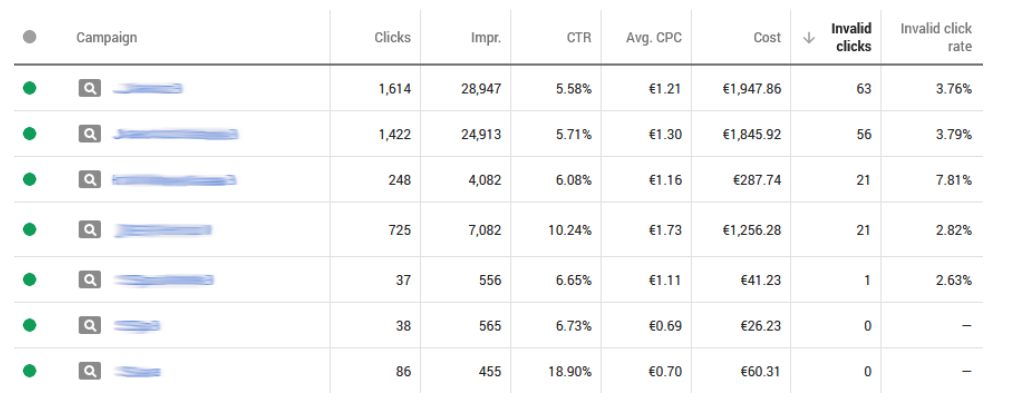
Photo: Standard Campaign report with Invalid clicks columns added. This is a quick way to see the intensity of invalid clicks Google is able to detect and possibly apply for a Google Ads refund.
Why You May Be Misreading Your Web Traffic Data
Understanding web log data is crucial for advertisers as it helps them optimize their campaigns and make informed decisions about their advertising strategies. At the same time, it is also vital to understand your web traffic if you wish to apply for Google Ads refund for any invalid clicks. However, some advertisers may struggle with interpreting their web logs – especially if they are using third-party tracking software that lacks support for auto-tagging.
Here are some common misunderstandings that advertisers may encounter when analyzing their web log data:
- Discrepancies between clicks and visits: Many advertisers may notice a discrepancy between the information in their web server logs and the information provided by Google Ads or Display & Video 360. This is because Google Ads and Display & Video 360 track clicks, while many tracking services count visits. Clicks and visits measure slightly different things, which can lead to discrepancies between the two.
- Short visit times and high bounce rates: Some advertisers may worry about short visit times or high bounce rates, as they may assume that users left their site immediately after loading it. However, these indicators do not necessarily show that users left the site immediately. They only mean that users left the site from the landing page without viewing any other pages. This could be due to several reasons, such as a landing page that’s hard to navigate or incorrect tracking code implementation.
- Relationship between IP address and people: One might assume that IP addresses are unique to individual users, but this is not always the case. Web log entries with the same IP address may belong to different users, as some ISPs assign IP addresses dynamically.
As shown in the above-mentioned examples, not everything that appears to be invalid traffic is necessarily fraudulent. Submitting incorrect information may result in Google revoking your ability to request refunds in the future, which is why it’s essential to investigate all potential causes before assuming it’s due to invalid clicks.
To start off, you might need to sift through your web logs and look out for any of the 6 signs of fraudulent clicks:
- A sudden surge in clicks
- Unusual peaks in impressions
- Low conversion rates
- Very high Click-Through Rate (CTR)
- A low number of page views
- High bounce rates
Keep in mind though, there are some other factors that might affect your ad performance, such as:
- Ad quality or relevance
- Seasonal trends or events
- Increased competition/bids for ad space
- Poor landing page design
- Poor optimization for mobile or slow loading times
- Poor site placement or audience targeting
Once you’ve ruled out these factors, you might be convinced that your campaigns are indeed being affected by invalid clicks. And when you consider that about 27% of all of today’s web traffic comes from click fraud or botnets, you’re probably not wrong.
The next step is for you to apply for a Google Ads refund investigation that can only be done manually. And, if you have the time and patience, that’s where things start getting a bit tricky…
How to Approach Click Investigation Requests within the Google Ads refund program?
Right off the bat, you should understand that the Google Ads refund policy gives no guarantee that your click investigation request will yield you a refund. Google Ads also doesn’t claim liability for traffic that happened more than 60 days ago, so it’s important to plan your requests carefully. On top of all that, there is a limit on the number of times you can apply for a refund.
You’ll have to submit proof of the invalid traffic you noticed. If you want to maximize your chances of approval, you’ll also have to include GCLID values, IP addresses, and other types of information you can find in your weblogs (see “Requesting an invalid traffic investigation” under Google’s Resources for Advertisers).
Once you’ve gathered all your evidence, the task of filling out the form starts:
- Navigate to the Click Quality Form provided by Google.
- Fill out all the necessary information requested on the form, including details about the campaign affected by the invalid clicks, your billing information, and the specific clicks that you’re reporting as invalid.
- Make sure to include copies of your web logs or tracking data and a detailed explanation of your issue to support your claim.
- Provide an email address where you can receive Google’s response, then click “submit”.
- Google will review your claim and notify you if it’s approved. This may take several days or even more than 6 weeks. If your claim is approved, the returned credit will be visible under the “Transactions” > “Adjustments” tab in the Billing area of your account.
The Real Issue with Click Investigation Requests
As if the fact that the outcomes of investigation requests are by default completely uncertain, there’s another big issue with investigation requests – the data. If you want to submit a good Google Ads refund request, you need to spend a lot of time digging through logs and arranging data to make it easy for Google Ads’ investigators to do their work. And once you’re done, it can take more than six weeks for Google to process each claim.
So, if it’s such a drain of your time and there’s no way to know if it will be successful, why go through the whole process of sending investigation requests? Well, you might actually get a Google ads refund, so it could be worth a shot. Click fraud can be a costly problem for advertisers, and if left unchecked, it can result in a lot of wasted ad spend and lost revenue. By submitting a request for a Google Ads refund, advertisers have the opportunity to recoup some of their lost ad spend and prevent further losses.
But this isn’t necessarily the best way to prevent click fraud from damaging your Google Ad campaigns.
Google Ads Refund Requests Made Easy
The real reason why you should always submit investigation requests is that you have the right to fight for every Google Ads refund you can get. But what if you never have to apply for a refund? Like they say, prevention is always better than the cure – and ClickGUARD can prevent your ad campaigns from getting fraudulent clicks in the first place.
ClickGUARD is a leading Google Ads click fraud protection and prevention software designed to protect your ads from fraudulent clicks and wasteful traffic. It functions similarly to a firewall by creating a barrier around your ads, which can identify and stop illegitimate clicks.
Our latest version has fully automated features to combat the never-ending influx of fraudulent non-human activity. Moreover, it is more robust, user-friendly, and intuitive than ever before.
ClickGUARD goes above and beyond by offering not only a powerful protection system but also extensive analytics and reporting capabilities. These features can help you optimize your campaigns’ performance and conversion metrics, giving you valuable data-driven insights for all your PPC advertising campaigns.
So even if Google Ads doesn’t give you your money back, you can still count on ClickGUARD to help protect your campaigns. With genuine clicks that can help drive business growth, ClickGUARD should definitely be on every marketer’s radar.
Google Ads Refund – FAQs
Does Google Ads offer refunds for invalid clicks?
Yes, Google Ads does offer refunds to protect advertisers from paying for clicks that are considered invalid or fraudulent. An “invalid” click can be defined as any click that artificially inflates an advertiser’s costs or generates illegitimate traffic. This can include automated clicks from bots, multiple clicks on the same ad, or manual clicks from competitors intended to increase an advertiser’s costs.
Does Google Ads detect all invalid or fraudulent clicks?
While Google Ads does use detection algorithms and systems to identify and remove some invalid or fraudulent clicks, they certainly do not catch all of them. If you believe there are any invalid clicks that Google Ads missed, you’ll need to apply for a refund investigation manually.
What should advertisers do if they suspect invalid or fraudulent clicks?
Advertisers who suspect invalid or fraudulent clicks should investigate all potential causes before assuming it’s due to invalid traffic. Once investigated, you can start filling out the Click Quality Form provided by Google. Keep in mind that you will have to submit proof of the invalid traffic you noticed.
What evidence should advertisers include when submitting a click investigation request?
You will need to provide evidence of the invalid clicks, including the date and time of the clicks, the affected campaign, and any relevant IP addresses or GCLID values. Screenshots of web logs or other documentation may also be helpful.
Is there a guarantee that a click investigation request will result in a refund?
No, the Google Ads refund policy gives no guarantee that a click investigation request will result in a refund. The investigation process can take anywhere from several days to more than 6 weeks, depending on the volume of requests and the complexity of the case. Google Ads also does not claim liability for traffic that happened more than 60 days ago. Once a refund is approved, it will be reflected in the “credits” section of the “billing and payment” page.
What is the best way to prevent invalid or fraudulent clicks?
Google Ads doesn’t catch every invalid or fraudulent click. And even if you identify them yourself, the Google Ads refund process is very time-consuming – with no guarantee of success. The best solution is to find a leading Google Ads click fraud protection and prevention software, like ClickGUARD, that is designed to protect your ads from fraudulent clicks and wasteful traffic.