
In Google Ads, conversion rate is a crucial metric that represents the percentage of users who, after clicking on an ad, complete a desired action, such as making a purchase, filling out a form, or signing up for a newsletter. A good Google Ads conversion rate varies by industry but averages around 4.8%. Understanding and optimizing your conversion rate can help you get more value from your ad spend and drive better campaign results.

In this guide, we’ll walk you through what’s considered a “good” conversion rate, how to calculate it, and what impacts it the most. You’ll see benchmark data, get tips to boost your own results, and learn how to protect your campaigns from low-quality traffic that could be dragging your numbers down. 

What Is a Conversion Rate in Google Ads?

In Google Ads, a conversion is any action you want users to take after clicking your ad. Basically, it’s the moment a click turns into something that matters and brings value to your business. That could be a purchase, a sign-up, downloading a guide, a phone call, a quote request, or even a button click on your landing page.

What counts as a conversion isn’t the same for everyone. An online store might focus on completed checkouts, while a B2B company might track how many people fill out a lead form. A local service business might care most about phone calls. 

A conversion rate tells you how often those clicks actually turn into one of those valuable actions. It’s one of the most important metrics in your campaigns because it helps you understand how effective your ads are at turning interest into results. That’s why conversion rate always needs to be looked at through the lens of your specific goals and campaign types.

How to Calculate Google Ads Conversion Rate

Calculating Google Ads conversion rate is pretty straightforward. The conversion rate formula looks like this:

Conversion Rate = (Conversions Ă· Total Ad Clicks) Ă— 100

Conversion Rate = (Conversions Ă· Total Ad Clicks) Ă— 100

Let’s say your ad gets 500 clicks, and 25 of those people complete a conversion — maybe they make a purchase or submit a lead form. Here’s how you’d calculate it:

25 ÷ 500 = 0.05 → 0.05 × 100 = 5% conversion rate

You don’t need to do this math manually all the time, though. Google Ads shows your conversion rate directly in the reporting dashboard, as long as you’ve set up conversion tracking properly. You’ll usually find it under the “Campaigns” tab or “Ads & Assets,” depending on how you’re breaking down your data.

Now, it’s also worth pointing out that conversion rate and click-through rate (CTR) are two very different things. CTR measures how many people click on your ad after seeing it, while conversion rate takes it a step further, measuring how many of those clicks actually do something valuable on your site. 

High CTR with a low conversion rate usually means your ad is eye-catching, but your landing page or offer might not be doing its job. It could also mean you’re being targeted by click fraud, but we’ll address this issue in a later section. 

Why Is Conversion Rate Important for Google Ads?

Your conversion rate is one of the biggest factors in whether your campaigns actually make money. That’s because it’s directly tied to your return on ad spend (ROAS). The higher your conversion rate, the more value you’re getting from the same ad budget.

Think about it: If two campaigns each get 1,000 clicks, but one converts at 2% and the other at 6%, you’re getting three times the results without spending a dollar more. That means better ROI, higher profit margins, and a lot more room to scale.

But conversion rate does more than affect your bottom line; it’s also a strong signal of how well your campaign is put together. A healthy conversion rate usually means you’re:

  • Reaching the right audience
  • Writing compelling ad copy
  • Sending people to a landing page that actually matches what they were expecting
  • Offering something that feels worth their time or money

On top of that, conversion rate can influence your Quality Score in Google Ads. Quality Score impacts where your ads appear and how much you pay per click. Better-performing ads often get rewarded with lower costs and better placements, which feeds right back into better conversion potential.

Discover how much you can save on your ad spend. Calculate your potential savings for free with ClickGuard’s Click Fraud Calculator.

Get Your Free Savings Report

What Is a Good Conversion Rate for Google Ads?

On average, the conversion rate for Google Ads across all industries sits at around 4.8%. That means for every 100 people who click on an ad, about five go on to take the desired action — whether that’s buying a product, filling out a form, or making a call.

But is 4.8% good? Well, it depends.

What “Good” Really Means

When marketers talk about a “good” conversion rate, they usually mean one that’s better than average, profitable, and ideally scalable — something that not only works now but can keep working as you increase your ad budget. In most cases, anything above 5% puts you ahead of the curve. And if you’re hitting 10% or more, you’re likely in the top tier of advertisers in your niche.

Why Your “Good” Might Be Different

That said, context matters a lot. What’s considered good for an e-commerce brand selling $20 t-shirts won’t be the same as for a B2B company offering a $10,000 service package. The type of campaign plays a role too: lead gen tends to convert differently than e-commerce or phone-call-driven campaigns.

Your sales cycle also affects things. Longer cycles, like those in B2B services, often lead to lower conversion rates, but each conversion tends to be much more valuable.

In the end, your business model, profit margins, and sales process all shape what kind of conversion rate makes sense for you. A “good” rate is one that brings in the right leads or customers at a cost that works and gives you room to grow.

Average Google Ads Conversion Rates by Industry

Conversion rates can vary a lot depending on your industry. What’s considered a solid performance in one sector might be underwhelming in another. That’s why comparing your results to the right benchmarks matters.

Here’s a look at average Google Ads conversion rates on the Search Network by industry, based on the most recent WordStream data:

Here’s a look at average Google Ads conversion rates on the Search Network by industry
  • Apparel: 2.77%
  • Arts & Entertainment: 4.51%
  • Business & Industrial: 3.71%
  • Computers & Electronics: 3.16%
  • Dining & Nightlife: 4.74%
  • Finance: 4.17%
  • Health: 4.63%
  • Hobbies & Leisure: 3.39%
  • Home & Garden: 4.26%
  • Jobs & Education: 4.15%
  • Law & Government (Legal): 7.45%
  • Real Estate: 3.40%
  • Retailers & General Stores: 4.23%
  • Sports & Fitness: 3.83%
  • Travel & Tourism: 3.95%
  • Vehicles: 7.98%

Search vs. Display Network Conversion Rates

The Search Network usually delivers higher conversion rates because it targets users with clear intent. When someone types a query into Google, they’re often actively looking for a product, service, or solution. That means the traffic coming from search ads tends to be more qualified and ready to take action. People clicking these ads already have an idea of what they want, so they’re more likely to convert compared to other types of traffic.

On the other hand, the Display Network shows your ads on a wide range of websites, apps, and videos, frequently reaching people who aren’t actively searching for your product or service at that moment. Because this audience is less “in-market,” conversion rates tend to be lower.

But Display ads play a valuable role in building brand awareness, staying top of mind, and especially in retargeting, where you show ads to people who’ve already visited your site. This can help bring those visitors back and boost conversions over time, even if the immediate rate looks lower.

 Here are the averages for the Google Display Network (GDN):

Here are the averages for the Google Display Network (GDN):
  • Apparel: 0.58%
  • Arts & Entertainment: 0.75%
  • Business & Industrial: 0.29%
  • Computers & Electronics: 0.50%
  • Dining & Nightlife: 0.56%
  • Finance: 0.80%
  • Health: 0.75%
  • Hobbies & Leisure: 1.12%
  • Home & Garden: 0.35%
  • Jobs & Education: 0.38%
  • Law & Government (Legal): 0.46%
  • Real Estate: 0.36%
  • Retailers & General Stores: 0.53%
  • Sports & Fitness: 0.80%
  • Travel & Tourism: 0.39%
  • Vehicles: 0.51%

Average Conversion Rate for Mobile on Google Ads 

The numbers can shift even more when you factor in mobile performance. For example:

Average Conversion Rate for Mobile on Google Ads 
  • Arts & Entertainment: 3.54% (Search) / 1.36% (GDN)
  • Automotive Service & Repair: 4.06% / 0.47%
  • Business Services: 3.16% / 0.43%
  • Computers & Electronics: 1.92% / 0.31%
  • Construction: 4.64% / 0.74%
  • Consulting: 2.04% / 0.30%
  • Education: 2.82% / 0.22%
  • Finance: 3.50% / 0.41%
  • Hair Salons: 5.95% / 4.45%
  • Healthcare: 4.24% / 0.80%
  • Home & Garden: 2.21% / 0.50%
  • Internet & Telecom: 3.33% / 0.35%
  • Law/Legal: 6.95% / 0.31%
  • Manufacturing: 2.28% / 0.54%
  • Nonprofits: 2.63% / 0.37%
  • Retail: 3.11% / 0.49%
  • Transportation: 3.83% / 0.45%
  • Travel & Hospitality: 2.40% / 0.48%

As you can see, some industries just convert better than others. Legal and automotive, for instance, tend to have higher rates because of the high intent and urgency often behind those searches. In contrast, computers, electronics, and B2B tech usually see more research-heavy behavior, so conversion takes longer or involves more steps.

The key takeaway? Don’t panic if your conversion rate doesn’t match a generic “average.” Use industry benchmarks to get a realistic picture of what success looks like for your vertical and focus on improving from there.

Factors That Affect Your Google Ads Conversion Rate

Several factors can influence how well your Google Ads convert clicks into valuable actions. Understanding these helps you spot where your campaign might be holding back and where there’s room to improve. Here are some of the key elements that impact your conversion rate:

  • Ad relevance and match type: The closer your ad matches what a user is searching for, the more likely they are to convert. Using the right keyword match types (broad, phrase, exact) helps control who sees your ads and keeps them relevant.
  • Landing page experience and speed: Even if someone clicks your ad, a bad user experience — like a slow or confusing landing page — can kill conversions. Fast-loading pages that clearly deliver on your ad’s promise and make it easy for users to take action boost your chances of success.
  • Targeting quality (keywords, audiences, geo): Targeting the right people is crucial. Choosing the right keywords, using audience segments, and focusing on locations where your offer makes sense all help attract qualified visitors who are more likely to convert.
  • Device and time of day: User behavior changes depending on device and when they browse. For example, mobile users might convert differently than desktop users, and certain times of day or days of the week may drive higher conversion rates for your business.
  • Competitor activity: If your competitors are aggressively targeting the same keywords or audiences, it can drive up costs and make conversions harder to get. Monitoring competitor moves and adjusting bids or messaging can help you stay competitive.
  • Click fraud and invalid traffic: Sometimes, clicks on your ads come from bots, competitors trying to drain your budget, or shady networks that generate fake traffic for profit. This is known as click fraud: When someone (or something) clicks on your ad with no intention of converting, just to waste your spend or manipulate results. Using click fraud protection tools can help detect and block this kind of invalid traffic, so your budget stays focused on attracting real, high-quality visitors who are actually likely to convert.
  • Ad copy and offer attractiveness: Your ad’s wording and the value you offer matter. Ads that clearly communicate benefits, create urgency, or highlight unique selling points tend to attract better-quality clicks that convert at higher rates.

How to Improve Your Google Ads Conversion Rate

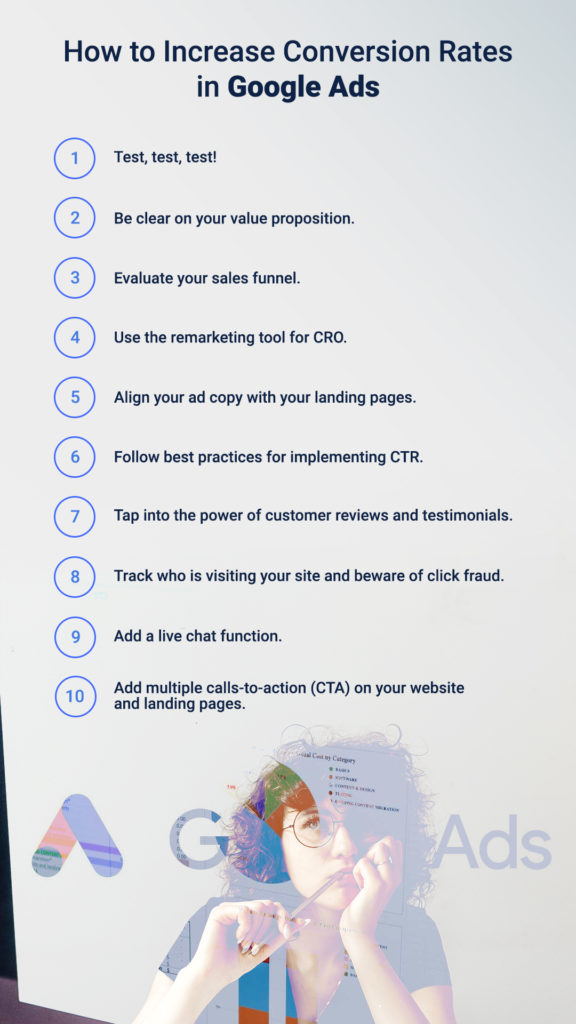
If your campaigns are getting clicks but not turning them into results, there are plenty of ways to fix that. Improving your conversion rate is about refining all the small things that lead someone from an ad click to action. Here are some of the most effective ways to boost your Google Ads conversion rate:

  • Optimize landing pages: Once someone clicks your ad, the landing page is where the real decision happens. Make sure it loads fast, is easy to navigate, and matches the intent of your ad. Clear, focused headlines, simple forms, and strong calls-to-action (CTAs) can all make a big difference.
  • Use conversion-focused copy in ads: The way you write your ads matters. Focus on benefits, not just features. Highlight what the user gets out of clicking, whether it’s a free trial, a special offer, or a solution to their problem. Strong copy attracts the right people and sets the right expectations.
  • A/B test ad creatives and landing pages: Don’t guess what works — test it. Run different versions of your ads and landing pages to see which actually performs better. Even small tweaks to headlines, images, or CTA buttons can lead to noticeable gains in conversions.
  • Use negative keywords to weed out bad traffic: Not every search is a good fit for your offer. By adding negative keywords, you can prevent your ads from showing up for irrelevant searches, keeping unqualified clicks out and improving your conversion rate.
  • Implement remarketing and audience segmentation: Not everyone converts on the first visit — and that’s okay. Use remarketing to re-engage visitors who showed interest but didn’t take action. Segment your audiences so you can tailor ads to different stages of the buyer journey, making each message more relevant and effective.

Discover how much you can save on your ad spend. Calculate your potential savings for free with ClickGuard’s Click Fraud Calculator.

Get Your Free Savings Report

Tracking Google Ads Conversion Rates

If you want to improve your conversion rate, you’ve got to track it properly first. Without accurate data, it’s impossible to know what’s working or what’s wasting your budget. Google Ads gives you powerful tools to measure conversions, but it all starts with setting things up the right way.

  • Set up conversion tracking in Google Ads: To start collecting conversion data, you’ll need to add a tracking tag to your website. You can do this directly through Google Ads or use Google Tag Manager to manage your tags more easily. This code lets Google track when users complete actions after clicking your ads.
  • Choose the right conversion actions: You can track actions like purchases, form submissions, phone calls, downloads, or even button clicks. Pick the ones that actually reflect your business goals — the things that move someone closer to becoming a customer.
  • Integrate with Google Analytics 4: Connecting your Google Ads account to GA4 gives you more detailed insight into how users behave after clicking your ad. You can see how they navigate your site, how long they stay, and what paths they take before converting, all of which help with optimization.
  • Track assisted conversions, not just last-click: Many users don’t convert the first time they click an ad. They might come back later through a different channel. Assisted conversions show you the bigger picture, revealing how your ads play a role in the overall customer journey, even if they weren’t the final touchpoint.
  • Monitor for conversion lag: Sometimes there’s a delay between when someone clicks your ad and when they actually convert, especially in industries with longer decision cycles. Keep an eye on conversion lag so you don’t misjudge your campaign performance too early.

Setting up proper conversion tracking gives you the data you need to make smart decisions, spot trends, and fine-tune your campaigns for better results over time.

How ClickGuard Can Increase Your Google Ads Conversion Rate

ClickGuard helps you get more out of your Google Ads by protecting your campaigns from the invisible threats that quietly drain your budget, like fake clicks, bots, and competitors. These types of clicks don’t convert and only waste your spend, which pulls down your conversion rate and skews your performance data.

By blocking invalid traffic in real time, ClickGuard makes sure your ads are only shown to real people with real intent. That means a higher share of your clicks come from users who are actually likely to take action, whether that’s buying, calling, or signing up. With better-quality traffic, your conversion rate naturally improves, and your ad budget starts working harder for you.

ClickGuard users can recover up to 30% of their ad spend that would’ve otherwise been lost to click fraud. On top of that, by removing noisy, low-quality data from your reports, the platform helps you optimize campaigns with cleaner insights, so every decision you make is based on what’s truly working.

Google Ads Conversion Rate FAQs

What is a good Google Ads conversion rate?

A good conversion rate in Google Ads is typically anything above the industry average, which sits around 4.8% on the Search Network. However, what’s considered “good” really depends on your business, industry, offer, and goals. In some high-intent industries like legal, top performers see conversion rates of 6% or even higher, while other sectors with longer sales cycles may average less. The key is making sure your conversion rate brings in qualified leads or sales at a cost that makes sense for your business.

What is a conversion in Google Ads?

A conversion in Google Ads is any action you’ve defined as valuable to your business. That could be a purchase, a form submission, a phone call, a newsletter sign-up, whatever you want users to do after clicking your ad. You choose which actions to track based on what matters most to your campaign goals.

Is 0.5% conversion rate good?

A 0.5% conversion rate is below average for most industries, especially on the Search Network. While it might be normal for certain Display campaigns or very cold traffic, it usually signals that something needs improvement, like your targeting, landing page, or offer. It’s not necessarily terrible, but it suggests there’s room to grow.

What does a 0.5 conversion mean in Google Ads?

Seeing something like “0.5 conversions” in your reports usually means Google’s using fractional conversion values, often due to how the action is tracked or attributed. For example, if someone completes a conversion action that’s shared across multiple channels or involves multiple touchpoints, Google might assign partial credit. It can also happen when you use conversion values or data-driven attribution models.